194 Results
-
 Canva Creative ProjectsEnrichment & EducationUnlock a world of creative possibilities with Canva, the ideal digital tool for beginners and crafters! This online interactive class will teach you how to harness the power of Canva to bring your creative projects to life. You'll learn to design and create everything from custom greeting cards and party invitations to printable wall art, gift tags, and personalized crafts. Whether you're working from scratch or customizing templates, you'll receive step-by-step guidance to turn your ideas into beautiful, print-ready projects. Leave this class with the confidence and skills to use Canva for all your creative crafting needs. If a student is unable to attend the live session, they can still register and access the recording at their convenience by request. Follow-up support is also included, and students are encouraged to reach out with any questions before or after the class.2026-2027
 -
 Canva Power Hour! Advanced Tricks To Save You TimeEnrichment & EducationTake your Canva skills to the nextl evel with advanced techniques and hidden features that will streamline your design workflow. This one-hour workshop is perfect for users already familiar with Canva basics who want to discover time-saving shortcuts, professional design hacks, and tools that make creating stunning graphics effortless. Leave with insider tips that will transform how you approach design projects and cut your creation time in half. If a student is unable to attend the live session, they can still register and access the recording at their convenience by request. Follow-up support is also included, and students are encouraged to reach out with any questions before or after the class.2026-2027
 -
 Canva for Awesome Beginners!Enrichment & EducationCanva is the perfect digital tool for beginners and novices! Open up a world of possibilities by learning how to use the easiest design website available all for free. In this class you will learn how to create designs from scratch or use templates with step-by-step guidance for any digital image you need. From online documents, business cards, email signatures and more, you'll leave this class with a practical guide to use Canva with confidence! If a student is unable to attend the live session, they can still register and access the recording at their convenience by request. Follow-up support is also included, and students are encouraged to reach out with any questions before or after the class.2026-2027
 -
 ChatGPT Powerhouse: Advanced Tips!Enrichment & EducationUnlock the full potential of ChatGPT in this dynamic one-hour masterclass designed for users ready to move beyond the basics. You'll discover advanced prompting techniques like system instructions, multi-shot examples, and chain-of-thought reasoning to get dramatically better results. Learn insider strategies for customizing outputs, managing context, and leveraging ChatGPT for complex tasks including analysis, creative projects, and professional workflows. Walk away with expert-level techniques to transform ChatGPT into a true powerhouse for your specific needs. If a student is unable to attend the live session, they can still register and access the recording at their convenience by request. Follow-up support is also included, and students are encouraged to reach out with any questions before or after the class.2026-2027
 -
 Classic Homemade Pierogi & Sweet Berry Pierogi!Culinary AdventuresHave some fun participating in this cook-along experience as you learn how to make your own homemade Classic Pierogi, and wonderful Sweet Berry Pierogi with 2 types of homemade dough and filling that will make your taste buds dance for joy! We will also be learning how to cook, and freeze these little dumplings that you can make ahead and store for a rainy day. No fancy equipment needed. This class has been so popular; it has even been featured in the American Polish Journal!2026-2027
 -
 Coding: Nintendo CharactersSTEM (Science, Technology, Engineering, & Math)Learn the basics of coding by creating a Nintendo-themed game with Scratch! Students will use colorful, drag-and-drop blocks to bring their favorite characters to life. Scratch was developed by MIT and makes coding fun and visual. Nintendo is a trademark of Nintendo of America Inc. and not affiliated with this camp. Home Technical Requirements: Computer: PC (Windows 10 or later) or Mac (OSX) with at least a 2GHz processor and 4GB of RAM Chromebooks, Tablets, and phones DO NOT Work. Internet: Broadband internet Webcam, Microphone and Speakers Zoom Installed on Computer, zoom link will be sent before class. Students should be comfortable using a PC, mouse, and keyboard. Additional Technical Requirements: Scratch Website Scratch Account (sign-up information will be provided before class)2026-2027
 -
 Culinary AdventuresCategory
 -
 D&D 101STEM (Science, Technology, Engineering, & Math)Learn the basics of Dungeons & Dragons with our modified version, then jump into a mini campaign! Build your character, roll some dice, and go on an adventure with your party. Dungeons & Dragons is a trademark of Wizards of the Coast and not affiliated with this camp. Home Technical Requirements: Computer: PC (Windows 10 or later) or Mac (OSX) with at least a 2GHz processor and 4GB of RAM Chromebooks, Tablets, and phones DO NOT Work. Internet: Broadband internet Webcam, Microphone and Speakers Zoom Installed on Computer, zoom link will be sent before class. Students should be comfortable using a PC, mouse, and keyboard.2026-2027
 -
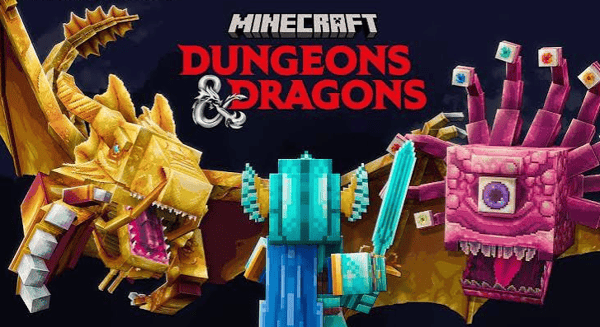 D&D: Minecraft AdventureSTEM (Science, Technology, Engineering, & Math)D&D meets Minecraft! Explore a custom-built Minecraft server that brings D&D to life, plus play a mini D&D one-shot with iconic Minecraft creatures. No experience with either game required. Minecraft is a Mojang Studios trademark and not affiliated with this camp. Dungeons & Dragons is a trademark of Wizards of the Coast and not affiliated with this camp. Home Technical Requirements: Computer: PC (Windows 10 or later) or Mac (OSX) with at least a 2GHz processor and 4GB of RAM Chromebooks, Tablets, and phones DO NOT Work. Internet: Broadband internet Webcam, Microphone and Speakers Zoom Installed on Computer, zoom link will be sent before class. Students should be comfortable using a PC, mouse, and keyboard. Additional Technical Requirements: Minecraft Java Edition ($30; more information will be provided before class)2026-2027
 -
 DUNGEONS & DRAGONS 101: ONE SHOT MINECRAFT ADVENTURESTEM (Science, Technology, Engineering, & Math)Dive into Dungeons and Dragons! Build problem-solving, teamwork, and creative thinking skills through this epic tabletop RPG. Learn the basics, create your character, and embark on an amazing adventure. Dungeons & Dragons is a trademark of Wizards of the Coast and not affiliated with this camp. Minecraft is a Mojang Studios trademark and not affiliated with this camp. Home Technical Requirements: Computer: PC (Windows 10 or later) or Mac (OSX) with at least a 2GHz processor and 4GB of RAM Chromebooks, Tablets, and phones DO NOT Work. Internet: Broadband internet Webcam, Microphone and Speakers Zoom Installed on Computer, zoom link will be sent before class. Students should be comfortable using a PC, mouse, and keyboard. Additional Technical Requirements: Minecraft Java Edition ($30; more information will be provided before class)2026-2027
 -
 Driver EducationDrivers EducationCLASSROOM DRIVER AND TRAFFIC SAFETY EDUCATION Today’s Driving School offers in-person, online and teleconference classes Register online at todaysdrivingschool.com click on Teen Driver Ed then choose Howard Lake-Waverly-Winsted They offer both classroom and behind-the-wheel instruction for teens and adults in the Howard Lake-Waverly-Winsted area. Flexible scheduling allows you to easily make up any missed days of class. All prices listed on their website are cash-discounted prices. Course descriptions and package options are also listed. In-Person Teen Driver 30 classroom hours 2026-2027 HLWW Middle School Media Center see todaysdrivingschool.com for package prices Monday-Thursday, October 5-8, 12-14, 19-21 from 5:30-8:30 pm Monday-Thursday, March 1-4, 8-11, 15-16 from 5:30-8:30 pm Monday-Thursday, June 7-10, 14-17, 21-22 from 9 am-12 pm Teleconference Class Teen Driver 30 classroom hours: Live remote learning classroom instruction led by one of our licensed instructors using Zoom. All students in Minnesota are eligible to attend. Online Class Teen Driver 30 classroom hours: Today’s Driving School is pleased to offer self-paced online instruction for adult and teen-age students. You may work on the course up to 3 hours per day, any time day or night. You have a full 90 days to complete the course, but you can complete the course in as little as 10 days. Work at your own pace. Behind-the-wheel packages: Today’s Driving School’s behind-the-wheel instruction is taught one-on-one, home pick-up and drop-off makes scheduling drives hassle free. See todaysdrvingschool.com for package prices.2026-2027
 -
 Drivers EducationCategory
 -
 ECFE (Early Childhood Family Education)Category
 -
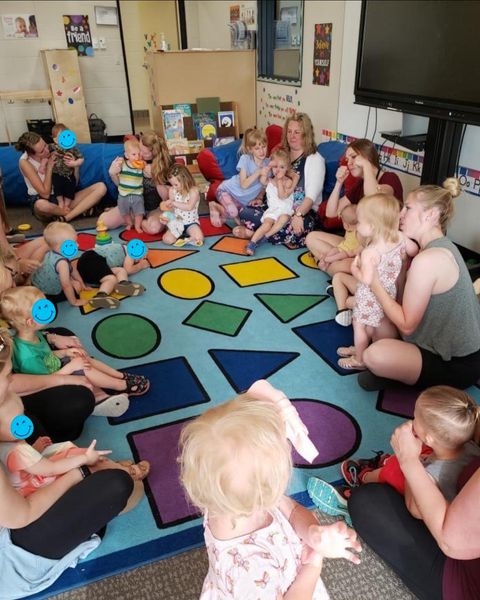
 ECFE Fall Kick-Off PartyParent & Child OpportunitiesAll families with children age birth to five. Attention all families! If you are curious about what ECFE is about, would like to come see the classroom and meet your teacher and staff, OR if you are a veteran ECFE family and want to come celebrate the start of another exciting new year, THIS IS FOR YOU! Come join Ms. Ellen and ECFE staff to play with friends you haven’t seen in a while, sing songs, do an artistic activity and have a yummy treat! We can’t wait to see you again and meet new friends! What an amazing year we have ahead of us!2026-2027
 -
 ENGINEERING IN MINECRAFTSTEM (Science, Technology, Engineering, & Math)Learn Minecraft circuit-building and engineering with Redstone! Build 2-3 electrical contraptions in this hands-on class. Minecraft is a Mojang Studios trademark and not affiliated with this camp. Home Technical Requirements: Computer: PC (Windows 10 or later) or Mac (OSX) with at least a 2GHz processor and 4GB of RAM Chromebooks, Tablets, and phones DO NOT Work. Internet: Broadband internet Webcam, Microphone and Speakers Zoom Installed on Computer, zoom link will be sent before class. Students should be comfortable using a PC, mouse, and keyboard. Additional Technical Requirements: Minecraft Java Edition ($30, not required for the class, but is needed to use the mods later)2026-2027
 -
 Early Childhood ScreeningEARLY CHILDHOOD SCREENING The State of Minnesota requires all children to be screened prior to the start of kindergarten. HLWW schedules Early Childhood Screening events for families with young children throughout the school year. Screening at age three is preferred and recommended. Screening is most valuable when completed before your child turns four years old. What is Early Childhood Screening: Early Childhood Screening is a free and simple check of how your child is growing, developing and learning! At a screening appointment a trained professional will play with your child and screen different areas of their development including: vision, hearing, height, weight, immunization progress, large/small muscle development (fine and gross motor), thinking skills, language, communication skills, cognitive development, and social and emotional development. Why is Early Childhood Screening Important: Screening helps identify children who may benefit from early childhood services before they enter school and connects them with appropriate resources and programs. If your child has already been screened, he/she does not need to be screened again.Category
 -
 Early Childhood Screening - December 11Early Childhood ScreeningEARLY CHILDHOOD SCREENING The State of Minnesota requires all children attending kindergarten to be screened. HLWW schedules screening for families with young children throughout the school year. Screening at age three is preferred and recommended. Screening is most valuable when completed before your child turns four years old. What is Early Childhood Screening: Early Childhood Screening is a free and simple check of how your child is growing, developing and learning! At a screening appointment a trained professional will check: vision, hearing, height, weight, immunizations, large/small muscle development (fine and gross motor), thinking, language, communication skills, cognitive, social and emotional development. Why Early Childhood Screening Important: Screening helps identify children who may benefit from early childhood services before they enter school and connects them with appropriate resources and programs. If your child has already been screened, he/she does not need to be screened again.2026-2027
 -
Early Childhood Screening - November 13Early Childhood ScreeningEARLY CHILDHOOD SCREENING The State of Minnesota requires all children attending kindergarten to be screened. HLWW schedules screening for families with young children throughout the school year. Screening at age three is preferred and recommended. Screening is most valuable when completed before your child turns four years old. What is Early Childhood Screening: Early Childhood Screening is a free and simple check of how your child is growing, developing and learning! At a screening appointment a trained professional will check: vision, hearing, height, weight, immunizations, large/small muscle development (fine and gross motor), thinking, language, communication skills, cognitive, social and emotional development. Why Early Childhood Screening Important: Screening helps identify children who may benefit from early childhood services before they enter school and connects them with appropriate resources and programs. If your child has already been screened, he/she does not need to be screened again.2026-2027
-
Early Childhood Screening - October 23Early Childhood ScreeningEARLY CHILDHOOD SCREENING The State of Minnesota requires all children attending kindergarten to be screened. HLWW schedules screening for families with young children throughout the school year. Screening at age three is preferred and recommended. Screening is most valuable when completed before your child turns four years old. What is Early Childhood Screening: Early Childhood Screening is a free and simple check of how your child is growing, developing and learning! At a screening appointment a trained professional will check: vision, hearing, height, weight, immunizations, large/small muscle development (fine and gross motor), thinking, language, communication skills, cognitive, social and emotional development. Why Early Childhood Screening Important: Screening helps identify children who may benefit from early childhood services before they enter school and connects them with appropriate resources and programs. If your child has already been screened, he/she does not need to be screened again.2026-2027
-
Early Childhood Screening - September 25Early Childhood ScreeningEARLY CHILDHOOD SCREENING The State of Minnesota requires all children attending kindergarten to be screened. HLWW schedules screening for families with young children throughout the school year. Screening at age three is preferred and recommended. Screening is most valuable when completed before your child turns four years old. What is Early Childhood Screening: Early Childhood Screening is a free and simple check of how your child is growing, developing and learning! At a screening appointment a trained professional will check: vision, hearing, height, weight, immunizations, large/small muscle development (fine and gross motor), thinking, language, communication skills, cognitive, social and emotional development. Why Early Childhood Screening Important: Screening helps identify children who may benefit from early childhood services before they enter school and connects them with appropriate resources and programs. If your child has already been screened, he/she does not need to be screened again.2026-2027
-
 Enrichment & EducationCategory
 -
 Enrichment OpportunitiesCategory
 -
 Escape the Labyrinth: VR Game DevelopmentSTEM (Science, Technology, Engineering, & Math)Build your own VR games! Start with smaller projects to learn coding and design basics, then construct a full labyrinth with challenges, characters, and immersive exploration. View projects on mobile devices or VR systems like Oculus. Home Technical Requirements: Computer: PC (Windows 10 or later) or Mac (OSX) with at least a 2GHz processor and 4GB of RAM Chromebooks, Tablets, and phones DO NOT Work. Internet: Broadband internet Webcam, Microphone and Speakers Zoom Installed on Computer, zoom link will be sent before class. Students should be comfortable using a PC, mouse, and keyboard. Additional Technical Requirements: Constructs Website Constructs Account (sign-up information will be provided before class)2026-2027
 -
 Fabulous Food FunEnrichment OpportunitiesKids will have fun making delicious fall harvest foods featuring apples and other fall ingredients. Youth will practice basic cooking skills and taste what we create! Please indicate any food allergies when registering. Youth may ride a bus from the elementary schools to the high school, please indicate use of this option on registration.2026-2027